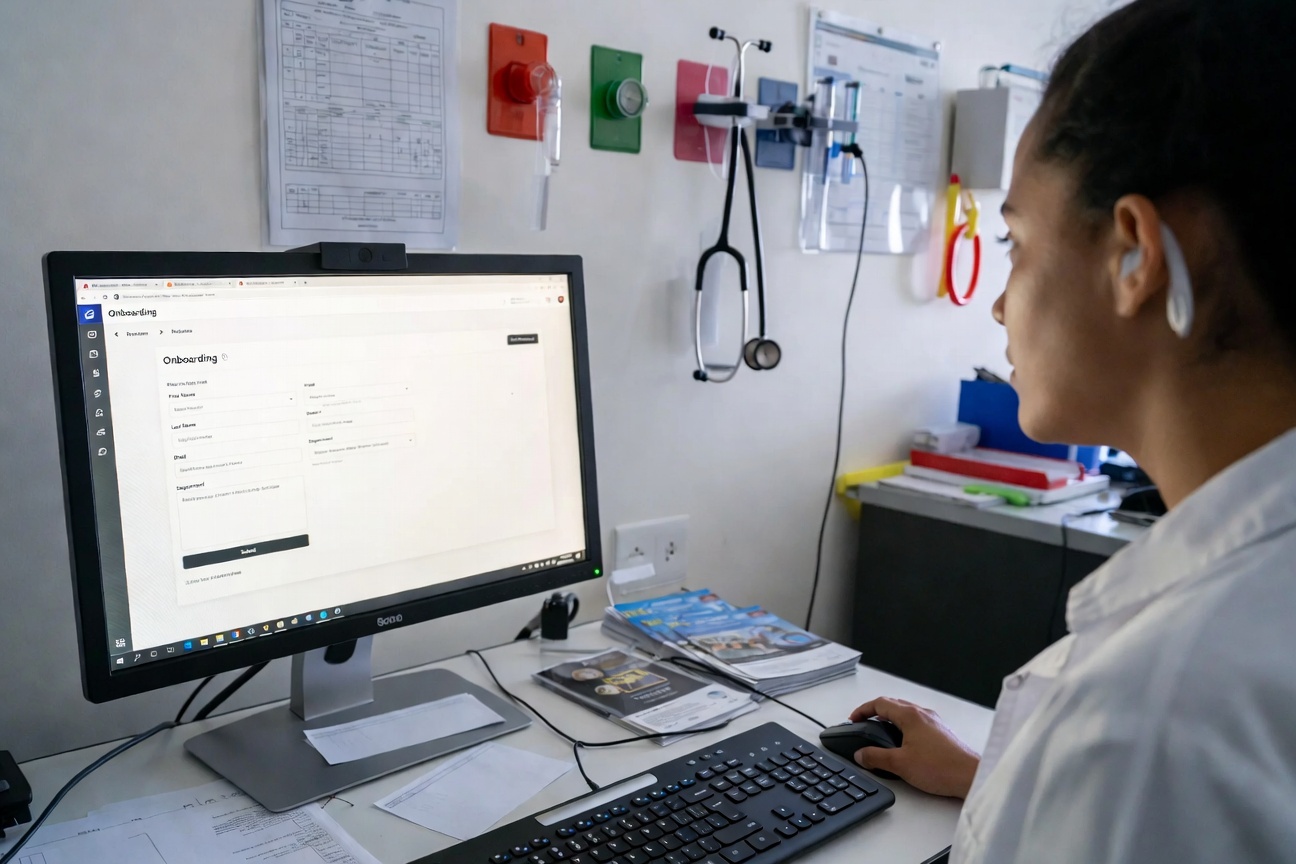
Investing in onboarding software improves the efficiency of your processes by automating time-intensive manual tasks such as credentialing. Using onboarding software in your facility ensures compliance, improves employee engagement and retention, and enhances productivity and performance.
Key Takeaways
- Onboarding software optimizes the onboarding process, saving healthcare facilities time and money while reducing the errors and inconsistencies of manual processes
- Some must-have features include automated workflows, document management, real-time tracking and reporting, and compliance management
- The best onboarding software for your facility depends on your onboarding needs, the size of your facility, and your budget.
Healthcare onboarding software is a digital platform that streamlines the process of integrating new healthcare employees into an organization. Instead of relying on paper forms, manual data entry, and back-and-forth emails, the software automates the entire onboarding process.
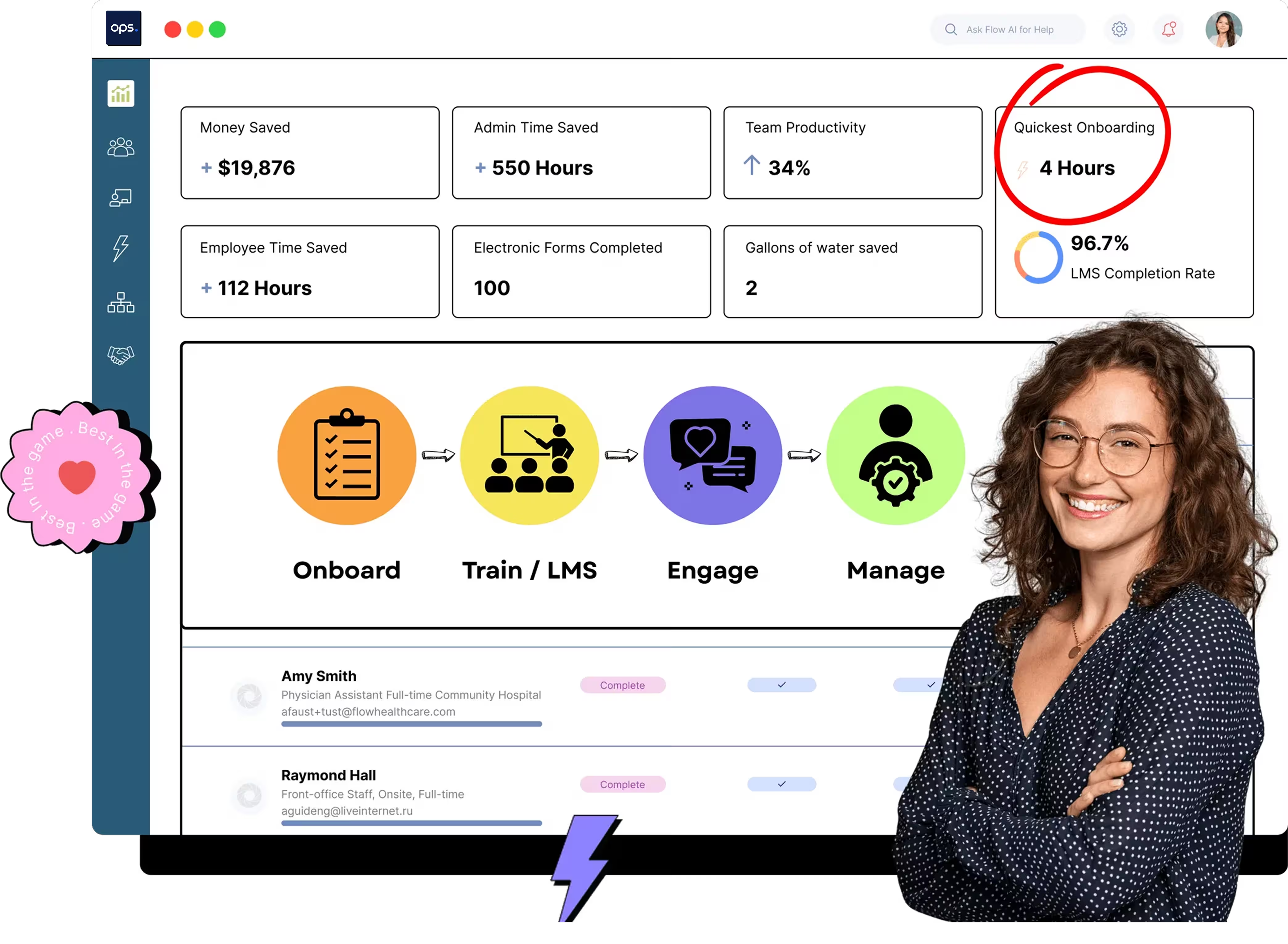
The software saves healthcare facilities time and money. Facilities that have used ops.work have significantly reduced their onboarding time, with a record of 2.5 hours for the shortest onboarding time, while also saving thousands of dollars in employee onboarding costs.
The software achieves this with a set of robust features that automate your onboarding, track progress, and generate reports. These features are essential for any healthcare facility seeking to save time, reduce costs, and enhance employee satisfaction.
Here’s an overview of the productivity gains, time, and cost savings from using ops.work:
11 Best Features to Look for in Healthcare Onboarding Software
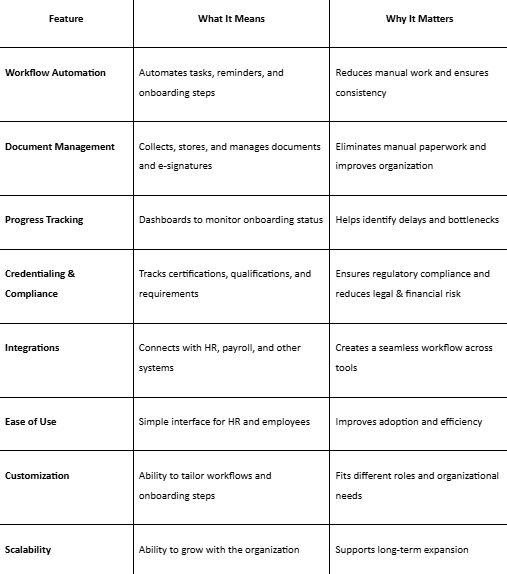
Here is a list of features to consider when selecting the best healthcare onboarding software.
1: Automated Employee Preboarding
A good onboarding solution should facilitate preboarding. Preboarding includes all the activities that occur between an employee accepting a new role and their first day of work.
For healthcare facilities, these activities lay the groundwork for successful onboarding, keep new hires engaged, and improve staff retention. Some of the preboarding tasks that software automates include:
- Sending invitations to new applicants
- Sending welcome emails with a new hire packet. This packet contains a checklist of the required documents and references.
- Sending administrative paperwork that applicants must sign, including a letter of offer and policy acknowledgements
- Assigning role-specific pre-boarding tasks to complete before onboarding begins
Once they receive this information, they sign and upload the necessary documents, allowing your team to proceed with other preboarding tasks, such as setting up email accounts.
2. Credentialing
Credentialing is a crucial function when hiring healthcare staff. But manual credentialing can take weeks to complete. Therefore, automated credentialing should be a necessary feature in the onboarding software you purchase.
This software should validate the qualifications of each new hire to ensure they are qualified and licensed to provide healthcare services. Some of the credentialing tasks include:
- Primary source verification
- OIG exclusions monitoring
- License verification
- National Provider Identification
- DEA verification
- Malpractice insurance verification
ops.work includes a comprehensive suite of features to reduce credentialing time from weeks to a matter of hours. Our software includes automated credentialing workflows and checklists to:
- Track the credentials and documents each employee should provide based on their role
- Run comprehensive background and reference checks within minutes
- Outline credentialing steps on the employee and admin interface
- Eliminate redundant tasks with custom credentialing forms
- Auto-assign credentialing forms and tasks to employees based on their roles
- Auto-fill data points such as employee information to reduce errors and save time
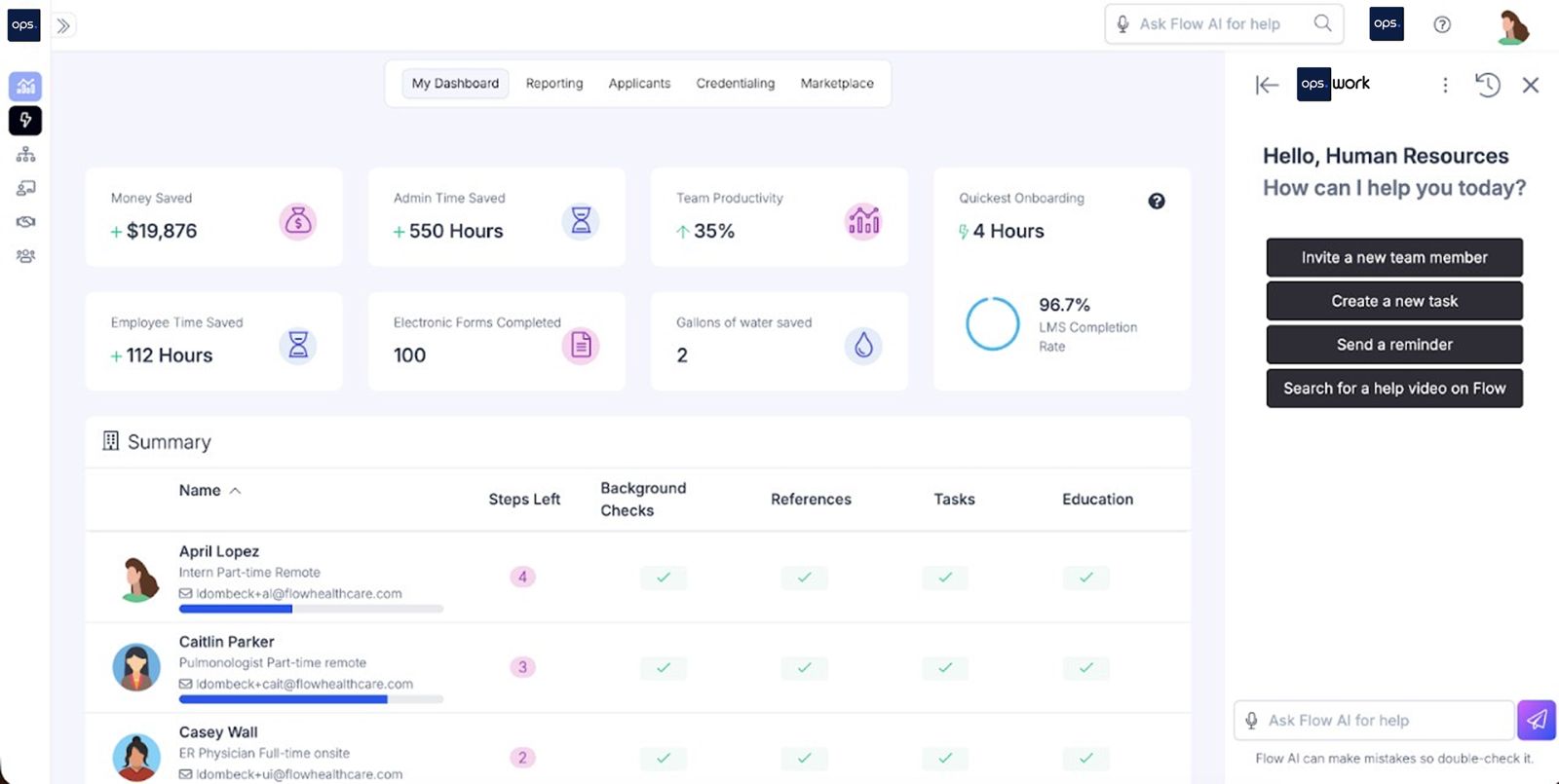
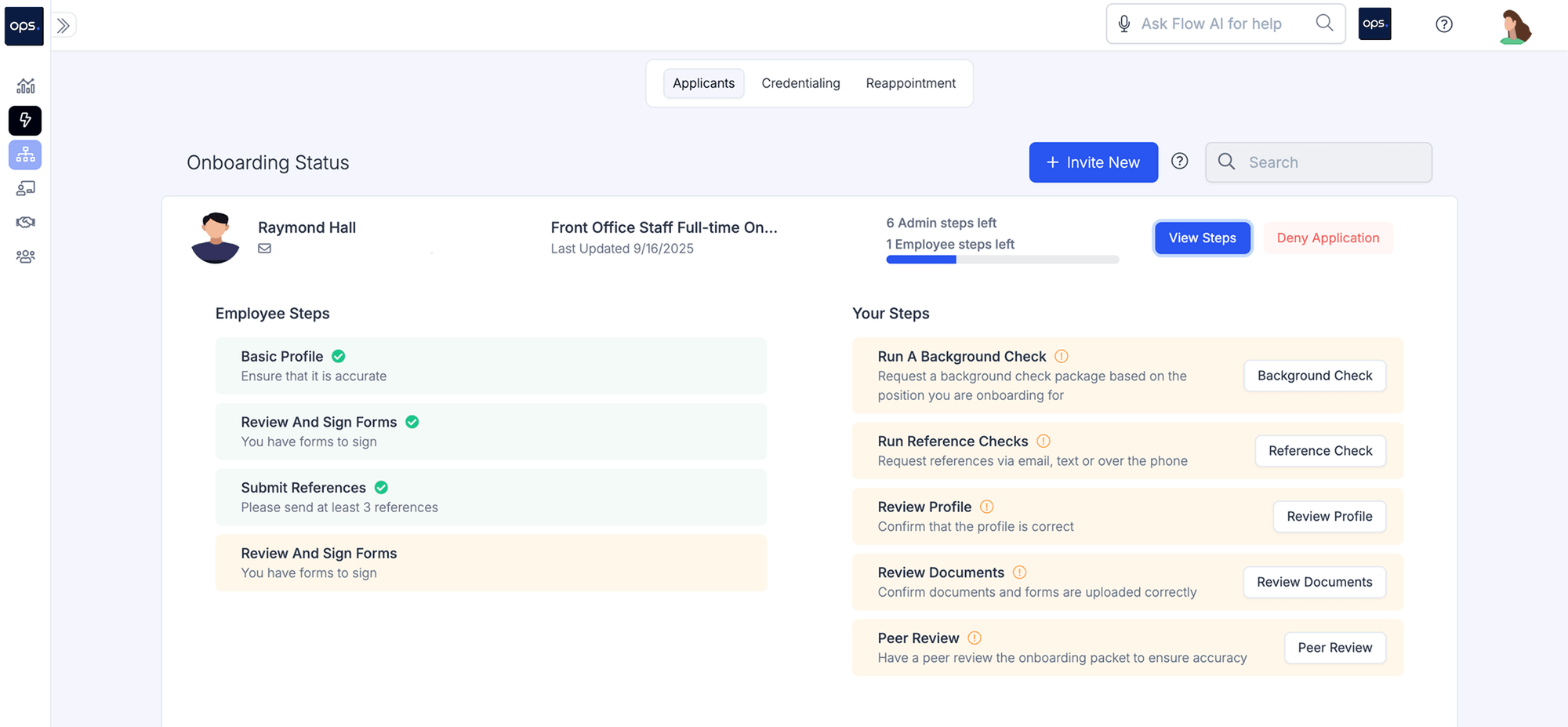
In addition to automating these tasks, ops.work allows you to view pending onboarding tasks at a glance, including the person responsible for each task:
3. Reappointment Tracking
Reappointment is the process of reevaluating your healthcare staff’s credentials to verify that they are still qualified to provide healthcare services. This process repeats in two- to three-year cycles depending on the employee’s qualifications.
However, with several staff members and varying renewal timelines, it’s easy to miss key deadlines, which can result in non-compliance risks. ops.work automates reappointment tracking, allowing you to view upcoming reappointments and track the progress of completing each one.
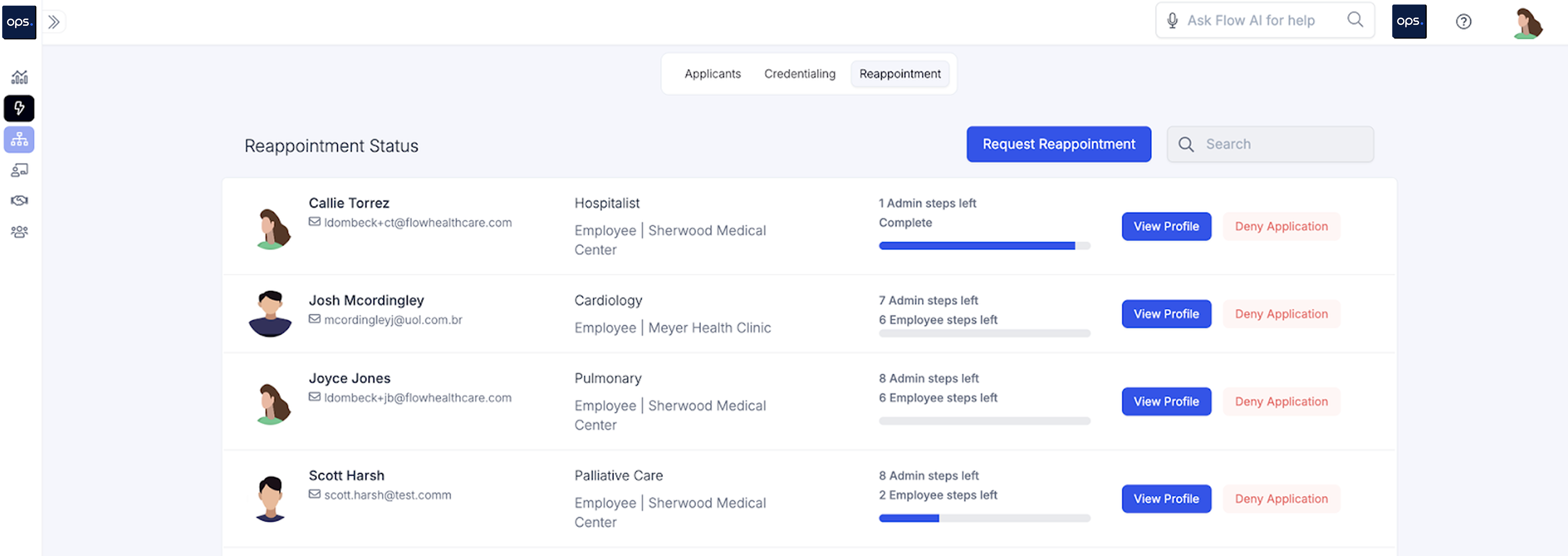
The software automatically reviews employee credentials to check for upcoming renewals. Once found, it creates notifications that are displayed on your onboarding dashboard.
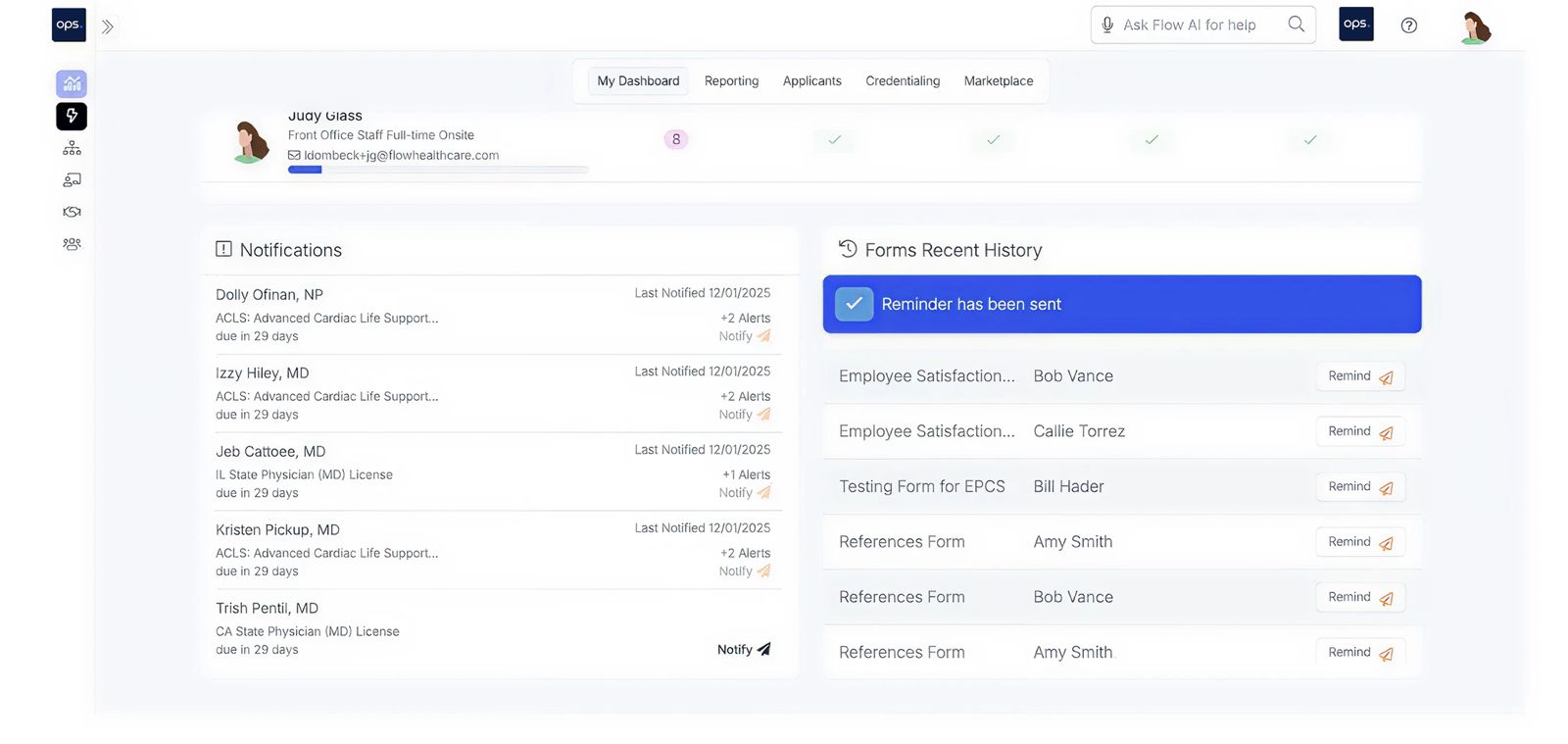
Other functionalities available to facilitate reappointment tracking include:
- Automatic reminders to employees about expiring credentials
- Creating follow-up tasks and assigning them to the respective employees and admins
- Escalation features to alert key stakeholders when employees fail to upload credentials for reappointment. At this point, the HR or compliance team will be notified to follow up directly with the employee.
Sign up for our free plan to set up automatic reappointment tracking to manage credentialing for existing employees.
4. Digitized Document Management
Too much paperwork is one of the major challenges of healthcare onboarding. New hires, especially those in clinical roles, must complete multiple forms and submit documents to verify their qualifications.
Managing this paperwork manually can slow down the onboarding process. There’s also a higher risk of errors and missed documentation.
Onboarding software digitizes document management, incorporating paperless document management into your workflows. Some of the features that support your paperwork management include:
- E-signatures
- Onboarding forms and checklists to standardize data collection
- Digital new-hire paperwork, including tax forms and company documents that can automatically populate employee data from the HRIS system.
- Automatic document sorting and categorization
- Secure sharing across teams and locations
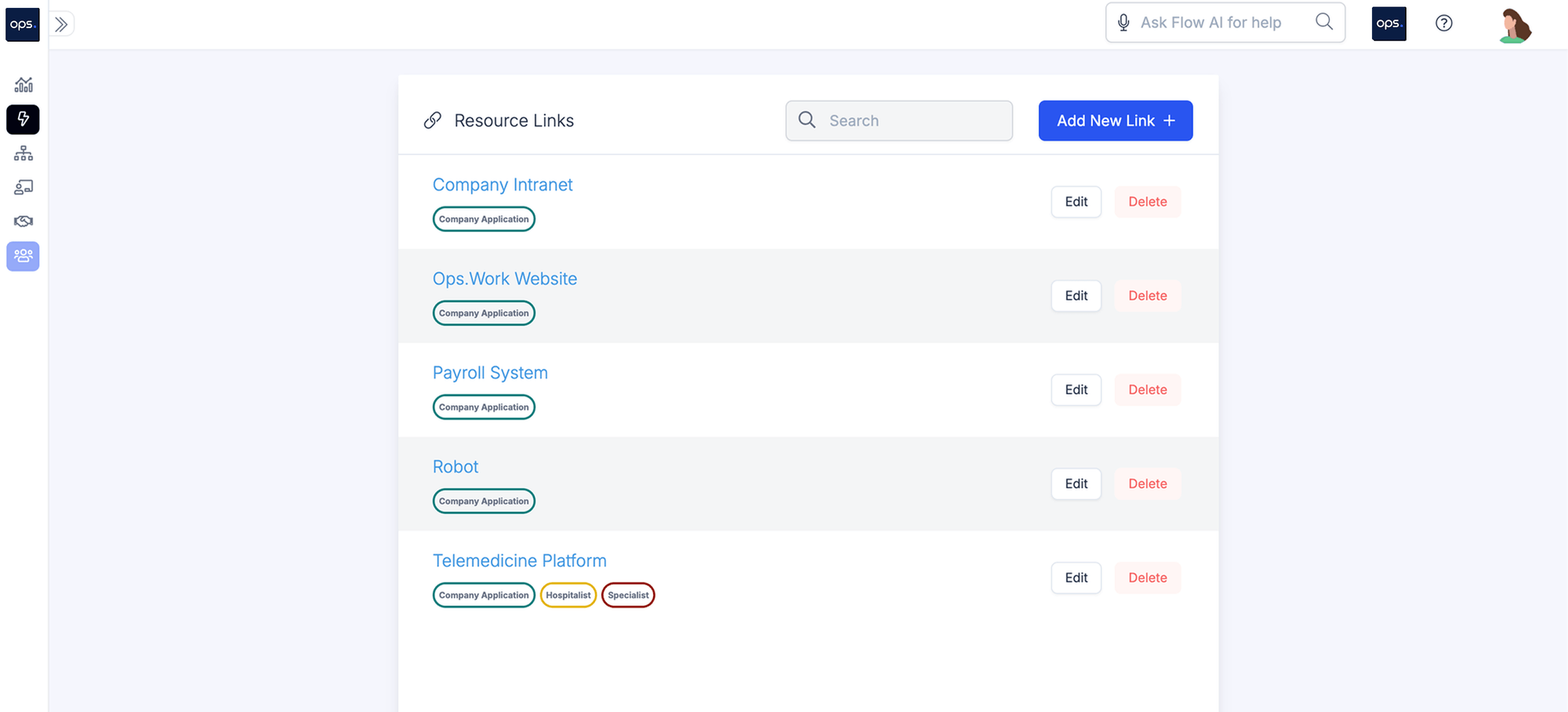
Ops.work provides a centralized document storage platform to provide a single source of truth for teams that require onboarding data to generate various reports. These files are encrypted and stored in a HIPAA-compliant repository with robust access controls.
5. Custom Onboarding Workflows
Workflows outline the onboarding steps a new hire takes to be integrated into your healthcare organization. For the HR team, effective onboarding workflows guide you on the key tasks to complete when onboarding an employee.
For employees, efficient workflows ensure they are fully prepared to fulfill their duties and responsibilities in compliance with both internal and external regulations. This improves employee retention and reduces compliance risk.
A fully automated onboarding workflow ensures you deliver a seamless onboarding experience to new employees. It also facilitates cross-departmental communication, ensuring that each employee receives a personalized onboarding experience tailored to their role.
Ops.work offers a comprehensive onboarding dashboard that enables you to create custom workflows tailored to your organization’s specific needs and priorities. Here’s a sample workflow:
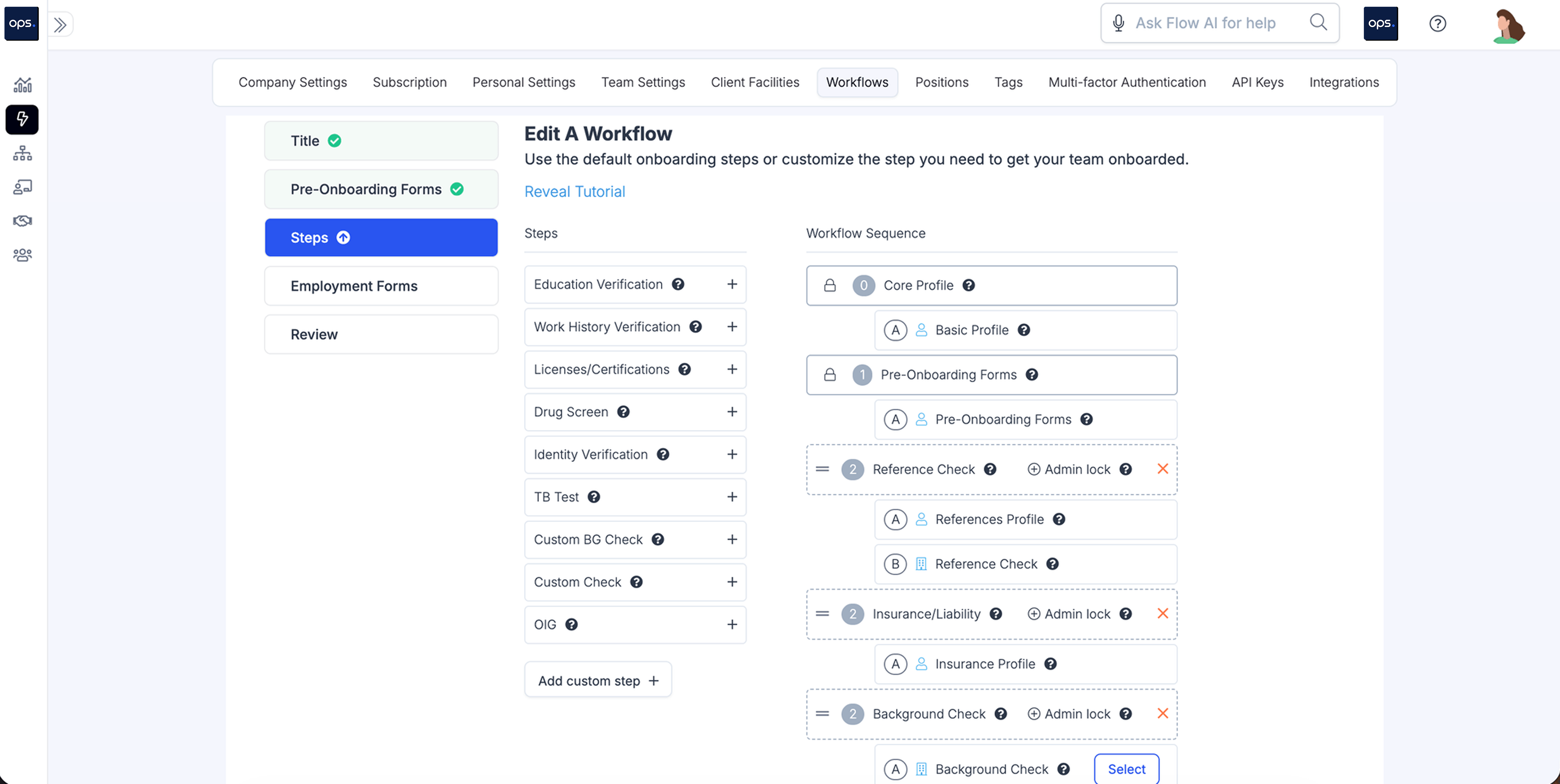
Some of the workflows you can customize and automate on ops.work include:
- Role-based training and tasks
- Automatically assign workflows based on the rules you set (including role, department, and location)
- Generate performance and compliance reports
6. Templates and Custom Checklists
An onboarding checklist provides a roadmap for the onboarding journey, while templates facilitate uniformity when filling out forms, tracking progress, or generating reports.
Having these checklists can help new hires have a positive first impression of your organization, therefore increasing employee engagement.
Checklists also clarify the roles of each person involved in the onboarding process, including L&D teams, HR, IT, hiring managers, and new staff. This way, you simplify tasks for your whole team while keeping the process organized.
An onboarding tool should provide customizable onboarding checklists and templates. Here are a few checklists that enhance the efficiency of your onboarding efforts:
- The overall onboarding checklist breaks down all the activities that happen in the preboarding phase. It also breaks down what’s expected of the employee in the first 30, 60, and 90 days in their new role
- Role-based checklists tailored to each employee’s job description
- An IT onboarding checklist to guide the IT teams on onboarding activities, such as setting up employee accounts and privileging
- Internal hire checklist
- Checklists for clinical and non-clinical roles
Ops.work enables you to create your own checklists with custom fields and tasks, facilitating your onboarding flow.
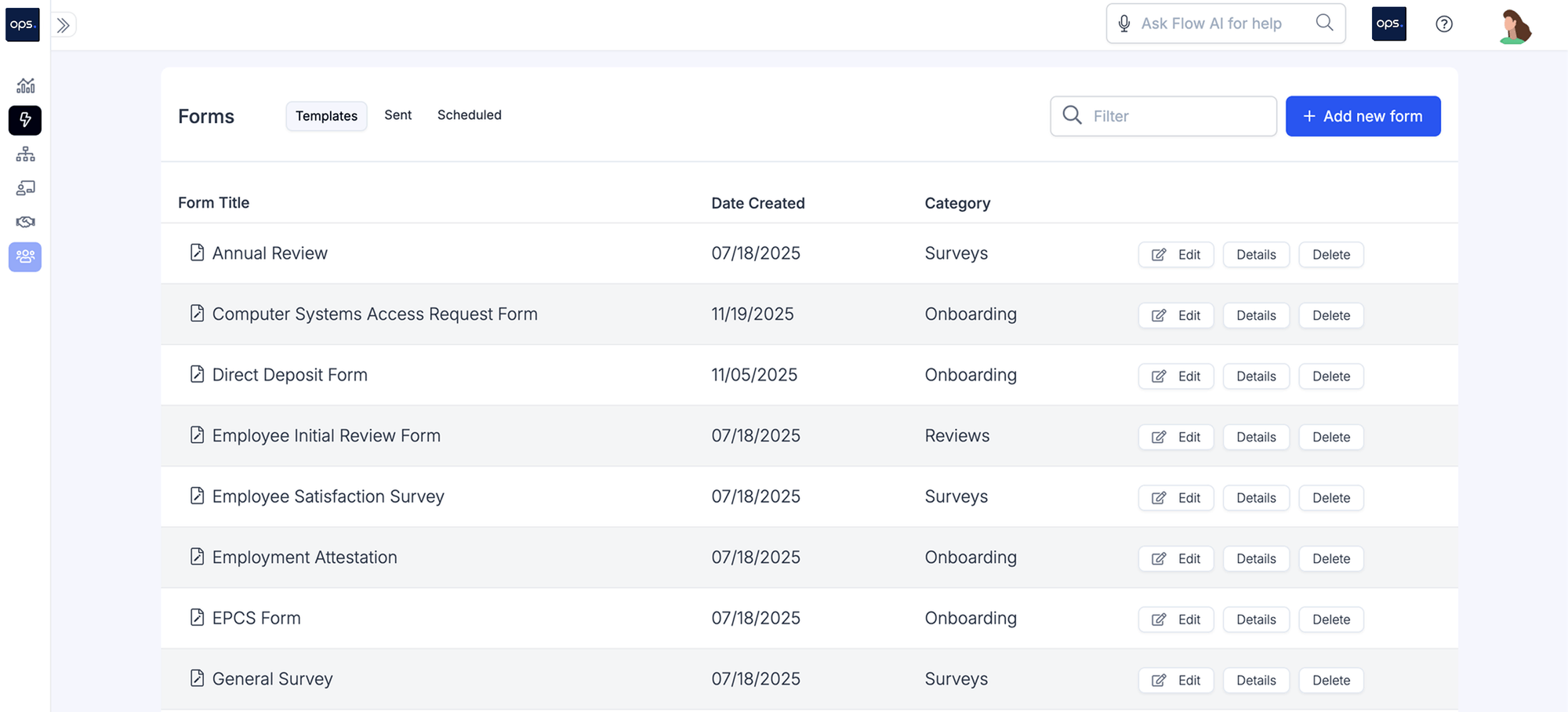
The platform also integrates with Jotform, providing access to hundreds of templates and checklists.
7. Permission Controls
Onboarding software is used by multiple teams in the organization, including:
- Employees
- Administrators
- IT
- HR
- L&D teams
- Legal teams
These groups use the system for various purposes. Therefore, the features and content they access also vary.
The platform should include robust permission control to determine who can access what content and features. There are different levels of permission controls to look for:
- Role-based permissions to ensure admins, employees, and other teams have access to features specific to their job functions. Role-based access control can go into granular detail, restricting who can create, edit, read, or delete certain data
- Use authentication features, including multi-factor authentication and passwords, to control and track who accesses what on the platform
- Audit trails that track who logged in and what they accessed to make compliance tracking easier
- Offboarding features that manage the entire employee lifecycle, removing or adding software access permissions as employee roles change
In addition to these features, the platform you choose for your onboarding activities should have built-in security features to protect sensitive employee data and patient records.
8. Real-Time Tracking and Automated Reminders
Real-time tracking is a must-have feature for onboarding software for healthcare organizations. This feature enables you to track the progress of various staff members throughout the onboarding journey.
Ops.work lets you track different aspects of the process, including:
- Document submissions
- Credentialing and reappointment
- Employee progress in their onboarding activities
- Upcoming onboarding tasks
One of the benefits of real-time tracking is timely feedback. You can identify and correct onboarding bottlenecks promptly to increase efficiency.
Real-time tracking, combined with automated reminders, enables your team to send targeted reminders to relevant stakeholders, prompting them to take action.
For example, if an employee has yet to submit the required onboarding documents within the stipulated time, automatic reminders can prompt them to complete their submissions. Similar alerts can be sent to the admins to notify them when an employee has completed the tasks assigned to them.
Real-time tracking and automated reminders also improve compliance with federal, state, and internal regulations. Hiring managers, HR teams, and legal teams can track the status of key onboarding activities.
These include credentialing, reappointment, background checks, and mandatory employee training. Tracking these activities enables your facility to maintain a comprehensive audit trail and identify issues before they pose a risk of non-compliance.
9. Compliance Management and Reporting
Compliance management features in onboarding software provide increased visibility into potential risks. Compliance tracking features let you know:
- The credentialing status of each employee
- Employees whose credentials need renewal
- The status of mandatory training for each new and existing employee
- The compliance documents employees have signed (such as policy acknowledgements)
Compliance tracking is a built-in feature of ops.work healthcare onboarding tools. It enables you to track various metrics, including training completion and credentialing status, and generate relevant reports. It begins the moment an employee joins the organization.
Here’s a dashboard with tools to help you create LMS reports that can be key in tracking mandatory compliance courses:
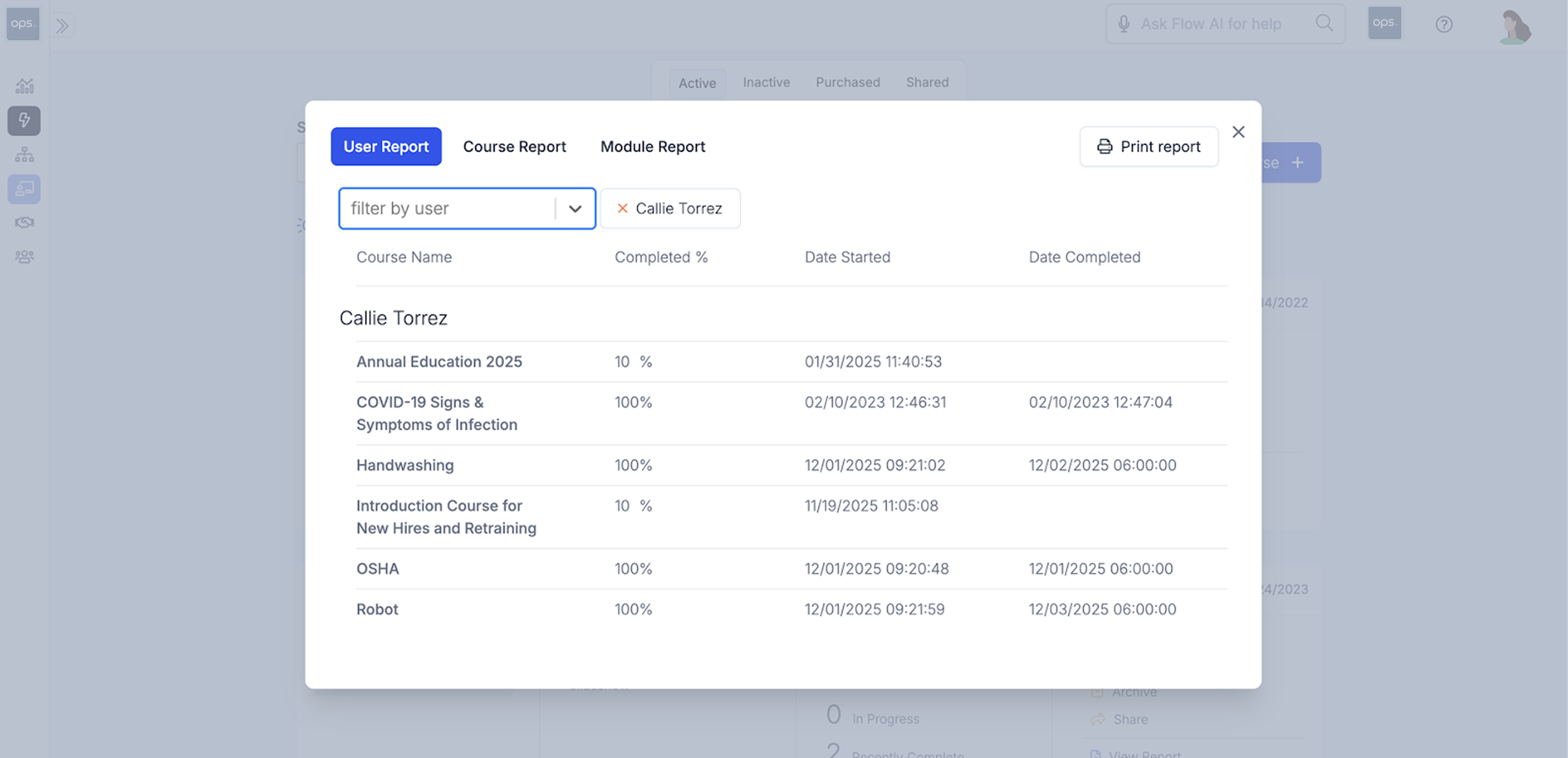
Here are some ways the platform tracks compliance throughout the onboarding process::
- Automatically assigning tasks to employees based on their roles. These tasks include uploading documents, signing policy acknowledgments, and completing mandatory compliance training
- Tracking in real-time the onboarding status of each employee
- Notifications of pending compliance tasks, such as reference checks, credentialing, and reappointments, with the option to automatically send reminders to the employee
- Real-time data collection and insights to identify compliance gaps in the employee onboarding process
- Comprehensive reporting dashboard with customizable parameters to allow you to track and report on various compliance metrics. These customizations also make it easier for different teams to draw compliance insights relevant to their departments
10. Integrations
Integrations expand the functionalities of your healthcare onboarding software. This eliminates data silos and task duplication, resulting in an efficient onboarding process. They also simplify tracking employee progress throughout the onboarding process.
Select a platform that seamlessly integrates with other systems within your facility, including EHR, HR, and payroll, and applicant tracking systems, for easy data transfer.
Here’s how integrations improve the onboarding process:
- Automated data entry, which reduces errors and saves time
- Seamless data exchange between different departments or locations, which increases onboarding efficiency
- Seamless compliance, as you can track onboarding progress and credentialing for all employees in one place
In addition to software integrations, modern onboarding platforms integrate AI for further onboarding automation. These platforms utilize AI to generate emails and reminders, recommend relevant courses to employees based on their roles, and facilitate data analytics and reporting functions.
11. User Experience
User experience influences how fast your new hires complete onboarding tasks. It also affects the adoption of the software by all team members.
An onboarding software must have a well-designed user interface with clearly labelled navigation tools. These navigation tools help to minimize errors and allow users to access the resources or functions they need at the click of a button.
It should also incorporate support features, such as tooltips and guided prompts, to help administrators and employees use the platform with ease.
A good onboarding tool further customizes these navigation tools based on the user's role. For example, an employee doesn’t need access to analytic tools. Their interface should be customized to display their profile, assigned tasks, and role-specific training courses.
How Do You Choose the Best Onboarding Software for Your Healthcare Facility?
Knowing what features to look for in an onboarding software is a crucial part of selecting the right platform for your facility.
The other part is choosing a platform that aligns with your organization’s goals and priorities. Here is a simple framework that can help you narrow down your options:
1. Conduct a Needs Assessment
Each healthcare facility invests in onboarding software for different reasons. Therefore, you must select a tool tailored to your specific needs.
To identify these needs, evaluate your current onboarding program for bottlenecks. These may include manual processes, inefficient workflows, inconsistent onboarding across departments or locations, and inaccurate reporting.
During the needs assessment, consult with HR, L&D, legal, and IT teams to determine the functionalities they’d require from the software.
2. Research Vendors
The needs assessment helps you identify your needs; therefore, it is key to understand the features that your organization requires in an employee onboarding software. With these features in mind, start researching vendors to find the best platform.
During the research process, compare vendors based on the size of your facility, the key features, and the costs. Other considerations when researching vendors include:
- Customer support before, during, and after implementation
- Compliance with federal and state regulations
- Scalability, especially for small to mid-sized businesses that are growing quickly
- Mobile accessibility
- Support for multiple locations
Create a shortlist of vendors who meet your selection criteria, then contact each to schedule a demo and gain deeper insight into how each platform works.
3. Roll out the Software
Once you purchase a suitable onboarding software tool, create an implementation plan and begin rolling out the system. Your plan should include:
- Key implementation activities, timelines, and milestones
- Clear role designations
- Training sessions to familiarize employees and stakeholders with the platform
- Piloting to test the software before fully launching it
Once rolled out, collect feedback from users to determine how well the platform is meeting your onboarding needs. Post-implementation monitoring also helps you optimize the software for efficient workflows.
Onboarding Different Healthcare Positions
See our detailed guides on how to onboard different positions in healthcare in the best way:
- Nurse Practitioner (NP) Onboarding
- Nurse Practitioner (APRN) Onboarding
- Physician Associate (PA) Onboarding
- Respiratory Therapists (RT) Onboarding
- Registered Nurse (RN) Onboarding
- Physical Therapist (PT) Onboarding
- Occupational Therapist (OT) Onboarding
- Speech Language Pathologist (SLP) Onboarding
- Certified Nursing Assistant (CNA) Onboarding
Conclusion
Hiring and onboarding new team members can be time-consuming. Onboarding software reduces the time it takes to bring on a new employee and simplifies complex onboarding tasks for hr and new hires. Some of the key features that optimize onboarding include automated onboarding features, employee management, compliance management tools, and integrations with existing systems. Sign up for ops.work to streamline your onboarding processes.
References
“Healthcare Workflow Automation Software.” Ops.work, 2026, www.ops.work/.
“5 Top-Rated Onboarding Software for HR Professionals.” Shrm.org, 2025, www.shrm.org/topics-tools/tools/white-papers/top-5-onboarding-tools-for-hr-professionals.
Frequently Asked Questions
Healthcare organizations face strict regulatory requirements, complex credentialing processes, and high staffing demands. Specialized software ensures compliance, reduces time-to-hire, and provides a great onboarding experience across roles and locations.
The best onboarding software automates key onboarding tasks from preboarding to employee training. This means it should provide features that automate these tasks. In addition, such software meets other business needs such as regulatory compliance and comprehensive reporting.
Ops.work offers a comprehensive solution for building and automating HR workflows, encompassing onboarding, training, and employee engagement. The platform provides access to all features, whether you’re managing 10 or 500 employees.
Yes. If your data is in CSV format, you can upload it directly to the onboarding platform. Alternatively, you can integrate your HRIS system to enable the platform to automatically retrieve data from the HR software.
According to Capterra, onboarding software can cost between $2 and $ 69 per user, per month. When looking for software based on pricing, consider the features you can access and the overall cost per user.
The implementation timeline for an onboarding system varies by vendor, but it can take up to a few months. Several factors determine this timeline, including the complexity of the software, integration requirements, and the training needed to start using the platform.
Onboarding software results in significant time and money savings while increasing productivity, training completion rates, and better compliance with federal and state requirements.